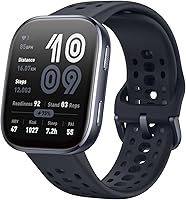
Apple Watch 11 vs Apple Watch SE 3: Which to Buy? (November 2026)
Pick the Apple Watch Series 11 if you want the full health toolkit and a bigger always-on display; pick the SE 3 if you want core tracking and safety for less. The Apple Watch 11 vs Apple Watch SE 3 call comes down to which sensors and screen you'll actually use.
On this page (10 sections)
- Apple Watch 11 vs Apple Watch SE 3 at a glance
- Which health sensors do you actually need?
- Does the always-on display change the choice?
- Battery life and charging compared
- Water resistance and workouts
- Design, durability and comfort
- Pairing, setup and phone fit
- Who should buy the Apple Watch Series 11?
- Who should buy the Apple Watch SE 3?
- Verdict: which Apple Watch should you buy?
Pick the Apple Watch Series 11 if you want the full health toolkit and a bigger always-on display; pick the SE 3 if you want core tracking and safety for less. In this Apple Watch 11 vs Apple Watch SE 3 comparison, the Series 11 wins overall on features, while the SE 3 wins on fit and simplicity.
Both watches cover the basics you'd expect from an Apple Watch. They track workouts, show notifications, pair with your iPhone and watch over your safety.
The split is narrower than the names suggest. The Series 11 adds sensors and an always-on screen, and the SE 3 keeps the essentials at a smaller size.
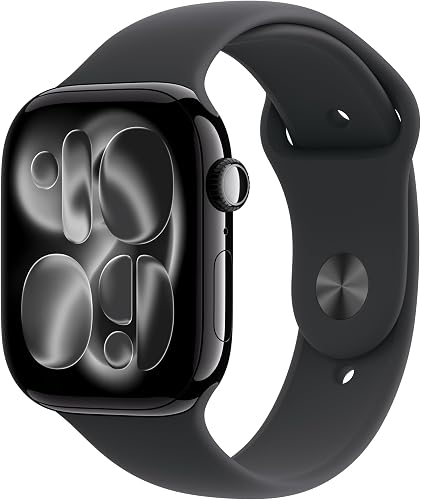

Apple Watch 11 vs Apple Watch SE 3 at a glance
The Series 11 is the fuller watch; the SE 3 is the lighter, more affordable entry point. The table below lines up the features that separate them.
| Feature | Apple Watch Series 11 | Apple Watch SE 3 |
|---|---|---|
| Case size | 46mm | 40mm or 44mm |
| Display | Always-on | Standard |
| ECG app | Yes | No |
| Hypertension notifications | Yes | No |
| Sleep score | Yes | Yes |
| Sleep apnea notifications | Yes | Yes |
| Battery | Up to 24 hours | Up to 18 hours |
| Fast charge | 8 hours in 15 minutes | Twice as fast as SE 2 |
| Water resistance | 50m | Water resistant |
| Fall and crash detection | Yes | Yes |
The shared row matters as much as the differences. Sleep tracking, workout metrics, fall detection and crash detection appear on both.
The Series 11 pulls ahead in heart and blood pressure monitoring. The SE 3 holds its own on daily activity and safety.
The SE 3 is also the slimmer build of the two. Its case measures 1.18 inches deep against 1.2 inches for the Series 11.
Apple describes the Series 11 as thin and lightweight and comfortable around the clock.
Which health sensors do you actually need?
Choose the Series 11 if ECG readings and blood pressure alerts matter to you; choose the SE 3 if you mainly want steps, workouts and sleep. This is the biggest single reason to pay more.
The Series 11 runs an ECG app and can alert you to high and low heart rates or an irregular rhythm. It also flags possible hypertension by analyzing how your blood vessels respond to heartbeats.
The SE 3 focuses on temperature sensing. That feeds insights into the Vitals app and the Cycle Tracking app, and it supports sleep score and sleep apnea notifications.
Both watches send fall and crash alerts and can call emergency services. Safety isn't the dividing line here; heart monitoring is.
If heart rhythm is something you want to keep an eye on, the extra sensors are the reason to choose the Series 11. Otherwise the SE 3 covers the everyday picture.
The Vitals app and what it shows
The Vitals app is where a lot of this data lands. On the Series 11 it shows your overnight health tracking metrics, so a night's sleep becomes a set of numbers you can read in the morning.
On the SE 3 the same app draws on temperature sensing instead. That means you get the temperature-driven insights without the overnight metric display the Series 11 describes.
Neither watch replaces a doctor. The alerts are prompts to follow up, not diagnoses, and Apple marks several of them with footnotes in the product data.
Does the always-on display change the choice?
The Series 11 keeps its screen awake and readable at a glance; the SE 3 screen wakes when you raise your wrist. That difference shows up dozens of times a day.
An always-on display means you can check the time, a notification or a workout stat without lifting your arm. It's a small convenience that adds up when you glance at your wrist constantly.
The SE 3 display still works well for reading texts, checking workouts and seeing alerts. You just raise your wrist first, the way earlier Apple Watches worked.
Screen size is the second part. The Series 11 comes in a 46mm case, the largest here.
The SE 3 gives you a 40mm or 44mm case.
Picking a case size for your wrist
A 40mm case suits slimmer wrists and people who want a watch that sits close and light. The 44mm SE 3 adds screen room without the Series 11's size.
The 46mm Series 11 gives the most display space of the three. It suits larger wrists and anyone who reads long notifications or follows workout stats on the watch.
The 40mm SE 3 weighs 9.6 ounces and the 44mm SE 3 weighs 8.6 ounces. The Series 11 weighs 1.28 ounces.
Those figures don't line up as like-for-like measurements across the models. Compare them by feel on your wrist rather than by the raw numbers.
Battery life and charging compared
The Series 11 is rated for up to 24 hours of normal use; the SE 3 is rated for up to 18 hours. Both get through a full day, but the Series 11 leaves more room.
The Series 11 also fast charges: 15 minutes on the charger gives up to 8 hours of normal use. That's handy if you forgot to charge overnight.
The SE 3 charges up to twice as fast as the SE 2 and gets up to 8 hours of battery in 15 minutes. It's quick to top up, just from a smaller starting reserve.
If you sleep with your watch to track sleep, plan charging around your day. A short top-up while you shower or eat breakfast covers either model.
The longer rating on the Series 11 makes it the easier watch to wear overnight and still get through the next day. That matters if sleep data is part of why you're buying.
The overnight routine in practice
Sleep tracking is only useful if the watch stays on your wrist all night and has enough charge left in the morning. The Series 11's 24-hour rating gives you more slack for a night of tracking plus a full day of notifications.
With the SE 3's 18-hour rating, the same routine works but leaves less margin. You'll want the 15-minute top-up to be a habit rather than an occasional save.
Both watches take the same short charge, so the difference is how often you'll need it. A 24-hour rating asks less of your routine.
Water resistance and workouts
Both watches handle workouts and everyday water; the Series 11 carries a clear 50m rating for swimming. Check your activity before you decide.
The Series 11 is water resistant to 50m and IP6X dust resistant. Apple says you can wear it for swimming and paddleboarding, so pool laps and open-water dips are in scope.
The SE 3 is water resistant too. Apple's listed features don't give a depth rating, so treat the Series 11 as the safer pick for regular swimming.
Our guide on whether you can swim with an Apple Watch on explains what the ratings mean in practice.
Both watches track workouts. The Series 11 adds advanced metrics like Pacer, Heart Rate Zones, training load and Workout Buddy powered by Apple Intelligence from your nearby iPhone.
The SE 3 tracks running, strength training and daily steps with real-time metrics and Workout Buddy. It covers the basics well for most people starting a routine.
Running and training features
Runners who follow heart rate zones or training load will get more from the Series 11. Those metrics help you pace effort across a week rather than one session.
The SE 3 gives you the workout tracking most people need: distance, pace, calories and goals. It's a solid first smartwatch for a new training plan.
Both watches use Workout Buddy, but the Series 11 credits its version to Apple Intelligence running on your nearby iPhone. The SE 3 lists Workout Buddy as a workout feature without that framing.
If you lean on post-workout feedback, read the feature lists closely.
Design, durability and comfort
The Series 11 is thin and light enough to wear overnight; the SE 3 comes in two sizes so you can match your wrist. Comfort decides whether you keep a watch on all day.
Apple says the Series 11 is thin and lightweight and comfortable around the clock, including during exercise and sleep. That matters if you plan to wear it overnight for sleep tracking.
Its glass display is 2x more scratch resistant than the Series 10, according to Apple. That's a real plus if you bump your wrist against desks and doorframes.
The SE 3 comes in 40mm and 44mm cases with dozens of customizable faces and a wide range of bands. You can change its look more easily than its hardware.
Both watches use the same band system, so straps carry over if you switch models later. That keeps the upgrade path simple.
The SE 3 models also describe dozens of easily customizable faces plus bands in different colors, styles and materials.
If you treat the watch as part of your outfit, the SE 3 gives you plenty to work with.
Pairing, setup and phone fit
Both watches are GPS models that pair with an iPhone or Wi-Fi. Setup is the same short process on either one.
You'll need an iPhone to use either watch. The Series 11 and SE 3 both send texts, take calls, play music and show notifications when connected.
Our walkthrough on how to pair an Apple Watch to your iPhone covers the steps, from turning on the watch to finishing the setup screens.
If you're also weighing a Samsung or Google watch, our Apple Watch vs Galaxy Watch comparison explains how the ecosystems differ. An Apple Watch only pairs with an iPhone, so your phone decides this part first.
The Siri experience differs slightly. The SE 3 highlights Siri AI for questions, post-workout stretch ideas and wellness tips.
The Series 11 uses Siri for the usual voice tasks and notifications.
One caveat applies to the SE 3's Siri AI: Apple notes it is rolling out in English and that usage limits may apply. If you rely on voice help in another language, the Series 11's standard Siri may be the more predictable choice.
Who should buy the Apple Watch Series 11?
Buy the Series 11 if health monitoring is the reason you want a smartwatch. The ECG app and hypertension notifications are the features the SE 3 doesn't have.
It also suits anyone who wants an always-on display. Glancing at your wrist without raising it is the everyday benefit you'll notice most.
The 46mm case fits larger wrists and people who read a lot on the watch. If you've owned a bigger Apple Watch before, this one feels familiar.
The 24-hour battery rating and fast charge make it the easier watch to wear overnight. Sleep tracking plus a morning top-up fits a normal routine.
The scratch-resistant glass and 50m water rating also matter for active buyers. A watch that survives a pool session and a bumped desk is one you stop worrying about.
Skip it if you mainly want steps, notifications and workout tracking. You'd be paying for sensors you won't check.
Who should buy the Apple Watch SE 3?
Buy the SE 3 if you want core Apple Watch features in a smaller, lighter package. Temperature sensing, sleep score, sleep apnea notifications and safety alerts all come standard.
The 40mm model suits slimmer wrists and anyone who wants a watch that stays out of the way. It's the smallest and lightest option in this comparison.
The 44mm SE 3 gives you a bigger screen without the Series 11 price. Pick it if screen room matters but the extra health sensors don't.
The SE 3 is also the better first smartwatch. Workout tracking, real-time metrics and Workout Buddy cover the basics without a long list of settings to learn.
Cycle Tracking is another reason to pick it. Temperature sensing feeds that app, so buyers who want cycle insights get them without paying for the Series 11's heart features.
Skip it if you want ECG readings, blood pressure alerts or an always-on display. Those are the Series 11 upgrades you'd be giving up.
Verdict: which Apple Watch should you buy?
The Apple Watch Series 11 wins this comparison for most buyers who want the fullest health picture. Its ECG app, hypertension notifications, sleep apnea alerts and always-on 46mm display put it ahead of the SE 3 on features and score.
Choose the SE 3 instead if your priorities are a smaller case, core tracking and a simpler feature set. The 40mm model fits slimmer wrists best, and the 44mm model gives you more screen for less than the Series 11.
The gaps that decide it are clear when you list them. The Series 11 adds an ECG app, hypertension notifications, an always-on display, a 50m water rating, IP6X dust resistance, 2x more scratch resistance than Series 10, and six more hours of rated battery.
The SE 3 keeps temperature sensing, sleep score, sleep apnea notifications and safety alerts, and adds Siri AI. Both watches have the Vitals app and sleep apnea notifications.
Either way, the Apple Watch 11 vs Apple Watch SE 3 decision comes down to sensors and screen. If you'll check heart and sleep data daily, the Series 11 earns its place.
If steps, workouts and notifications are enough, the SE 3 covers them well.
If you're still weighing the SE 3 against an older model, our Apple Watch SE 3 vs Series 9 comparison covers that pairing.
Frequently asked questions
Is the Apple Watch Series 11 worth it over the SE 3?
The Series 11 is worth it if you want ECG readings, hypertension notifications, a daily sleep score and an always-on display. The SE 3 still covers temperature sensing, sleep score and safety alerts.
Pick by which health features you'll actually check each day.
What does the Apple Watch SE 3 leave out compared with the Series 11?
The SE 3 doesn't include the ECG app or hypertension notifications, and its screen isn't always on. It also has an 18-hour battery rating against 24 hours on the Series 11.
The core fitness, sleep and safety features are shared.
Can you swim with both watches?
The Series 11 is water resistant to 50m, so Apple says you can wear it for swimming and paddleboarding. The SE 3 is water resistant, and Apple's listed features don't give a depth rating.
If regular swimming matters to you, the Series 11 is the safer pick.
Which Apple Watch is better for sleep tracking?
Both track sleep and give a daily sleep score. The Series 11 adds ECG and hypertension features, and both watches have the Vitals app and sleep apnea notifications.
If sleep data is your main reason for buying, the Series 11 offers the fuller picture.
Do both watches work with the same iPhone?
Yes. Both are GPS models that pair with an iPhone or Wi-Fi to send texts, take calls and show notifications.
The setup steps are the same for either watch.
Which size should I pick, 40mm or 46mm?
Choose 40mm for a slimmer, lighter fit and 46mm for more screen room. The 46mm Series 11 and the 44mm SE 3 both give you a bigger display.
Wrist size and how much you read on the watch are the deciding factors.